How to Add Your App to ChatGPT Interface with Apps SDK?

Published on
December 19, 2025
Updated on
December 19, 2025
How to Add Your App to ChatGPT Interface with Apps SDK?
Want to launch an app in ChatGPT? We tested the new SDK with a live PoC. Get the technical breakdown and deployment steps here.

In our recent article, Apps in ChatGPT: Higher Conversions or Lost Users, we explored the strategic implications of OpenAI’s shift toward becoming a platform. We debated the business pros and cons, and whether owning the interface beats the massive distribution of the ChatGPT ecosystem.

But strategy is only half the battle. We wanted to see exactly what this looks like in practice.

So, in case you’ve decided that this is a solution for you, or you just want to know in more detail what it takes to get running, here is our technical investigation. Our engineering team took a deep dive into the new Apps SDK to see how third-party developers can embed interactive UI and logic directly inside ChatGPT conversations.

Here is what we found.

How Your End-User Interacts With The ChatGPT Apps?

To understand what we are building, we first need to look at ChatGPT Apps from a user’s perspective. Here is how it normally goes: after entering the ChatGPT interface, a user might type something like: ‘Canva, create a social-media post for my product launch’ and the Canva UI appears inside your chat.

As we can see there is a little tag below the text input which shows that ChatGPT recognized an available app from the user's request. You can call the app by prefixing with the app name or ChatGPT can suggest the app during the conversation.

ChatGPT asked to fill the minimum needed information to be able to start a new product.
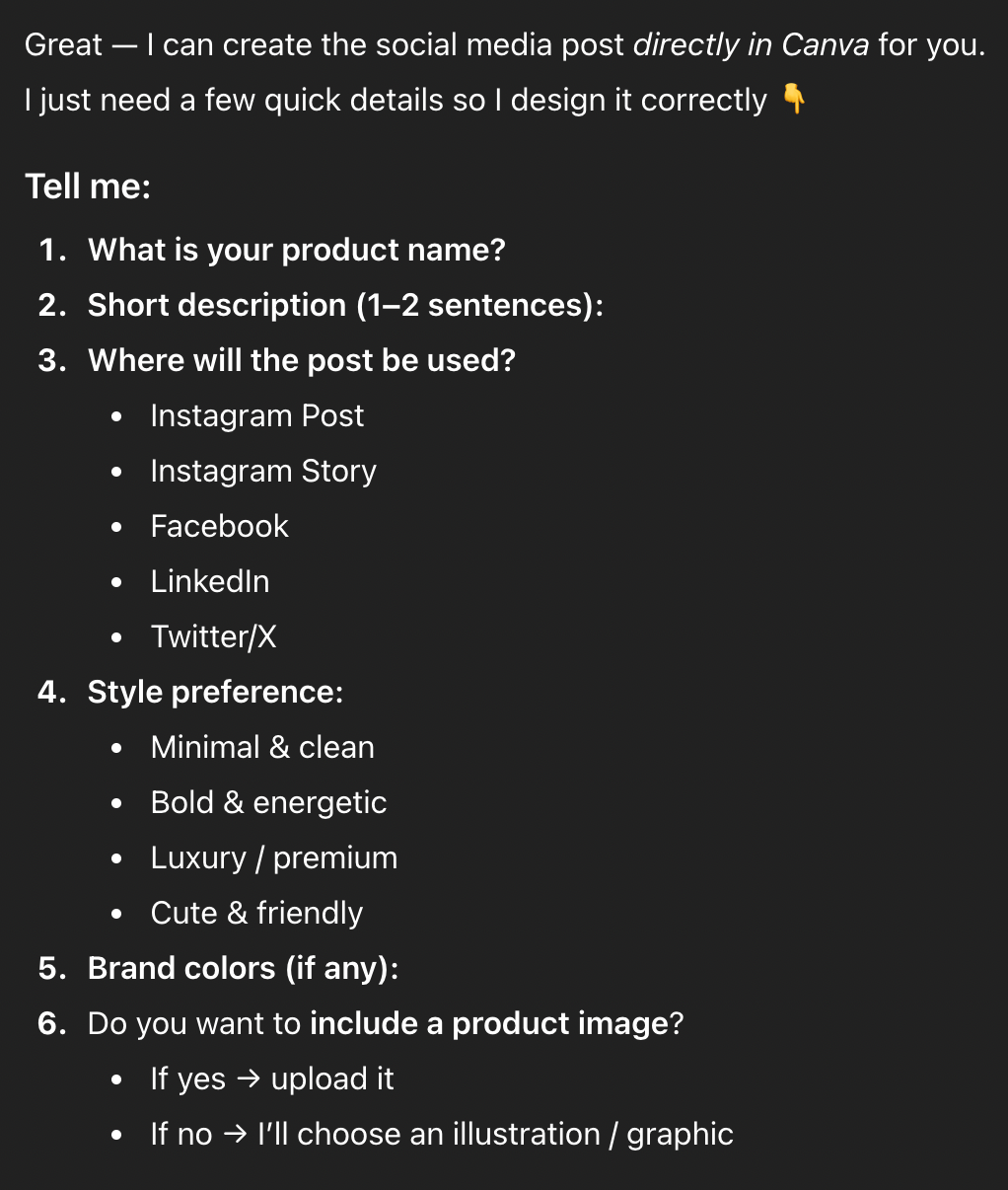
After being told to fill everything by itself and create something cool and totally random, it wanted to connect to the user's Canva account to be able to save the results.
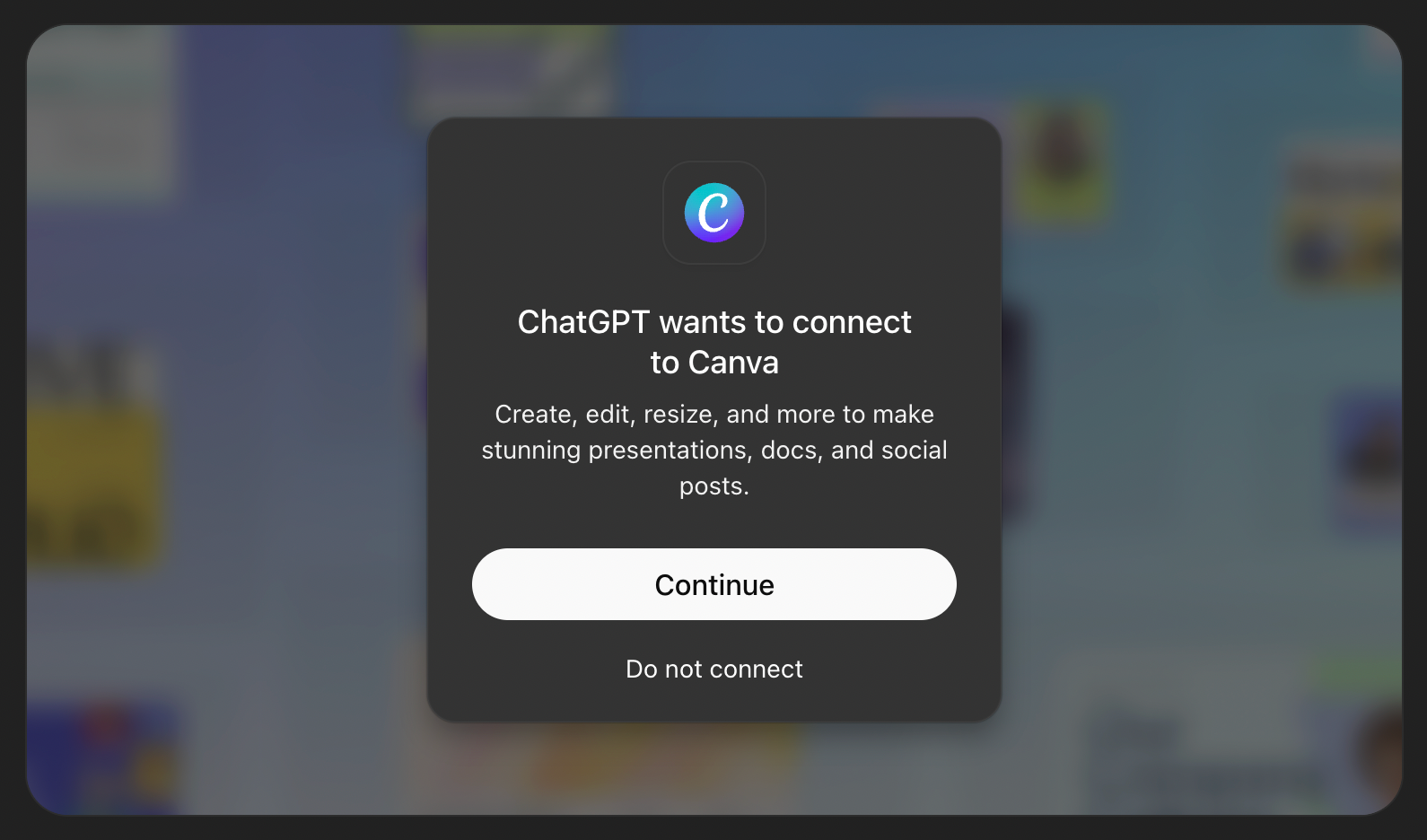
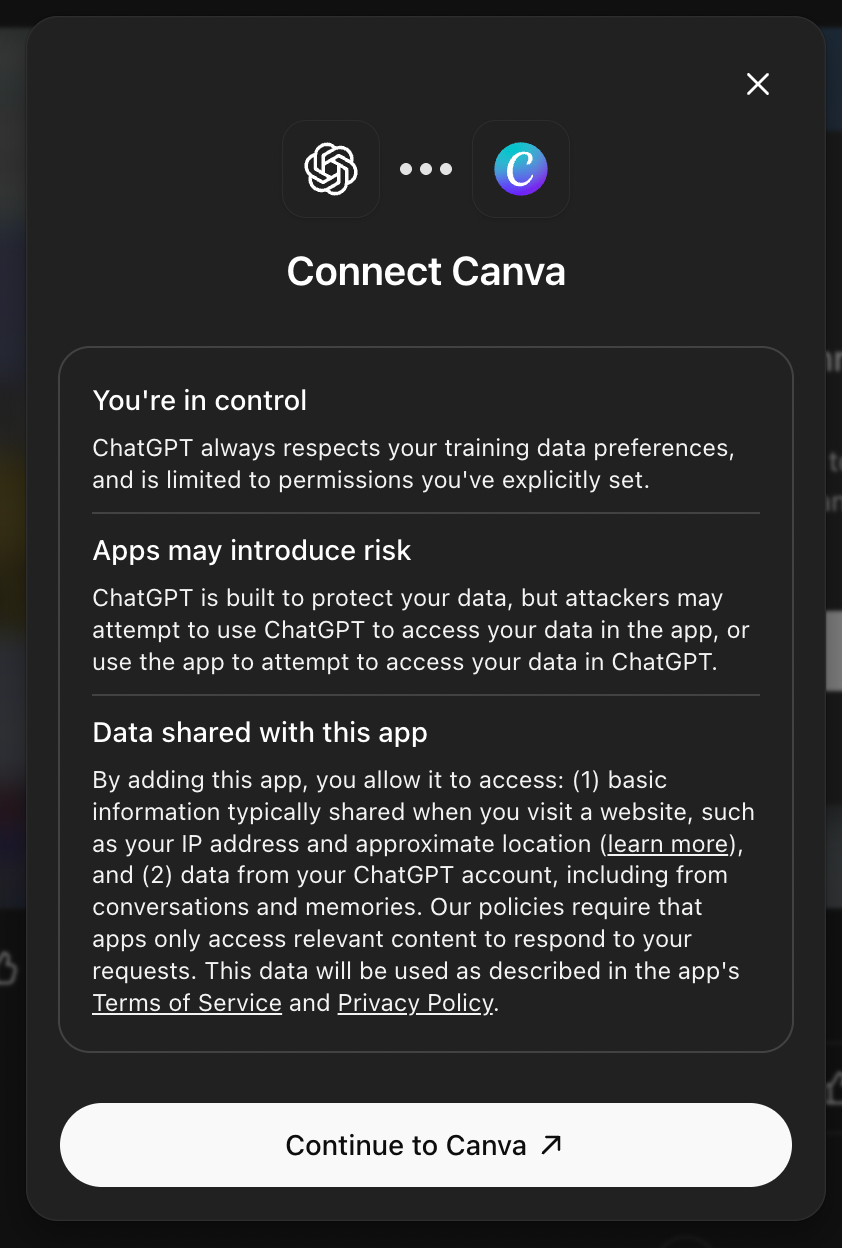
After giving some permissions Canva is finally connected to the ChatGPT and can start producing example data.

Here Canva created a few examples for the post called ‘NovaX Smart Bottle’, a new smart water bottle (style: bold & energetic, palette: electric blue / black / white). It provided design input for the product:

  • Product name: ‘NovaX Smart Bottle’.
  • Headline / hero text: ‘Stay Hydrated, Stay Smart’.
  • Subline: Intelligent hydration tracking • Long-lasting battery • Sleek reusable design.
  • Style: Bold typography, large headline, modern geometric shapes, product placeholder graphic (photo-style mockup), CTA button area.
  • Color palette (suggested hex): Electric Blue #00A3FF, Deep Black #0A0A0A, White #FFFFFF.
  • Suggested fonts: Montserrat (headline) + Inter (body) or similar clean sans.

How You Can Build Your App in ChatGPT?

As you could see, ChatGPT apps are web-based applications embedded within the ChatGPT interface. That is possible using the Apps SDK: developers provide a web UI and backend logic, while ChatGPT handles the conversational orchestration. This allows your app to respond to natural language commands and interact seamlessly with the user within chat.

But first let’s start with the things you need to know before we proceed with the step-by-step implementation journey.

Key Components

  1. Frontend Web UI – The user interface that ChatGPT will embed. Must be responsive for desktop and mobile.
  2. Backend / API – Processes user input, interacts with services (databases, external APIs, or AI), and returns structured responses.
  3. Manifest / App Configuration – JSON-based configuration that tells ChatGPT:
    • App name.
    • Triggers or commands.
    • Input / output format.
    • Permissions required.

Core concepts

MCP Server

The Model Context Protocol (MCP) server is the foundation of every Apps SDK integration. It exposes tools that the model can call, enforces authentication, and packages the structured data plus component HTML that the ChatGPT client renders inline. Developers can choose between two official SDKs:

  • Python SDK – Ideal for rapid prototyping, including the official FastMCP module.
  • TypeScript SDK – Suitable for Node / React stacks.

These SDKs support frameworks like FastAPI (Python) and Express (TypeScript).

Tool Descriptors

In Apps SDK, tools are the contract between your MCP server and the model. They describe what the connector can do, how to call it, and what data comes back. A well-defined tool includes:

  • Name – Action-oriented and unique (kanban.move_task).
  • Description – Clear explanation of when to use the tool.
  • Input Schema – Defined parameters with types and constraints.
  • Output Schema – Structured data returned by the tool.
  • Metadata – Includes _meta fields like openai/outputTemplate for linking to UI components.

Custom UX Components

UI components turn structured tool results into a human-friendly interface. Apps SDK components are typically React components that run inside an iframe, communicate with the host via the window.openai API, and render inline with the conversation. These components should be lightweight, responsive, and focused on a single task.

The Workflow

Developing a ChatGPT app begins with setting up a server that leverages one of the official SDKs — Python or TypeScript — typically using frameworks such as FastAPI or Express. This server, often referred to as the MCP server, acts as the bridge between ChatGPT and application logic. Within this environment, developers define tools, which are structured descriptors that outline the actions the app can perform, including the expected input and output formats. These tools form the contract between the app and the model, allowing ChatGPT to invoke the correct functionality based on user commands.

The frontend is implemented as a web-based UI that is embedded within ChatGPT’s chat interface. This UI is usually built with frameworks like React and communicates with the host through the window.openai API. The design of the UI should prioritize responsiveness and simplicity, ensuring a smooth experience for users on both desktop and mobile devices. Authentication mechanisms must also be integrated to verify user identity and maintain session context. Finally, persistent state management ensures that relevant user data and interactions can be stored securely, enabling multi-step or context-sensitive workflows.

Deployment Considerations

Once the app is developed, deploying it requires careful attention to platform requirements and security standards:

  • All endpoints must be served over HTTPS to ensure secure communication between the ChatGPT client and the MCP server. 
  • UI components need to be properly bundled and served with the appropriate MIME type to enable embedding. 
  • During development, tools such as ngrok can be used to expose local servers for testing and iteration. 
  • Environment-specific configuration, including API keys and secrets, should be managed securely through environment variables or platform secret managers. 
  • Observability is equally important: logging request identifiers, response times, and error messages allows developers to monitor performance and quickly diagnose issues.

Security and Privacy

Security and privacy are critical considerations when building ChatGPT apps:

  • Data handling practices should be minimal, collecting only the information necessary for the app’s functionality. 
  • Users must be informed about data usage, and consent should be obtained when required. 
  • Access controls, such as role-based permissions, help prevent unauthorized actions and maintain the integrity of the system. 
  • Compliance with relevant data protection regulations and OpenAI’s policies is essential to ensure that the app adheres to both legal and platform standards. 
  • Developers should also consider security audits and regular review of their code and infrastructure to proactively address potential vulnerabilities.

Testing and Optimization

Testing a ChatGPT app involves both functional validation and performance monitoring.

  • Rich metadata in tool descriptors enhances discoverability and ensures that the model correctly interprets app capabilities.
  • Backend endpoints should be stress-tested for scalability, while front-end components must be validated for responsiveness across device types. 
  • Collecting user feedback provides insights into usability and helps refine both the interface and core functionality. 
  • Optimization is an ongoing process: balancing performance, security, and user experience ensures that the app can operate effectively within the ChatGPT ecosystem while providing a seamless experience for end users.

Can You Build Native Mobile Apps in ChatGPT?

ChatGPT apps are inherently web-based and run inside the ChatGPT interface; it is not currently possible to embed fully native mobile code directly within the ChatGPT mobile app. This design has important implications for developers targeting iOS, Android, or cross-platform frameworks such as React Native.

To provide a seamless experience across mobile devices, developers must build a responsive web UI for their app. This UI should adapt to varying screen sizes and orientations, ensuring usability on smartphones and tablets. CSS frameworks, such as Tailwind or Bootstrap, or front-end frameworks like React, Vue, or Svelte, can help achieve a mobile-friendly design while keeping the interface lightweight enough to render smoothly inside ChatGPT.

For teams that already maintain a mobile app — such as a React Native application — ChatGPT apps can serve as a subset or extension of the full-feature app. Users may start with the ChatGPT-embedded web interface and, if additional functionality is required, transition seamlessly to the native app via deep linking. This approach allows developers to leverage the ChatGPT user base while still offering richer experiences in their native apps.

There are, however, some constraints and considerations to be aware of:

  1. Native integration limitations: ChatGPT does not allow embedding native mobile components directly; all interactivity must occur via web-based components.
  2. Authentication and session management: Developers must implement mechanisms to bridge user identity between ChatGPT and their backend systems. This ensures continuity of personalized experiences and secure access to user-specific data.
  3. Performance considerations: Mobile devices vary in screen resolution and processing power, so the web UI should be optimized for speed and responsiveness, avoiding heavy scripts or large assets.
  4. Cross-platform testing: Even with a responsive web design, testing across different mobile operating systems, browsers, and ChatGPT app versions is critical to ensure consistent behavior.

Overall, the recommended approach is to treat the ChatGPT app as a mobile-accessible mini-app that provides core functionality, while using deep links or integration with your native app to deliver more advanced features. This hybrid strategy maximizes reach within ChatGPT while preserving the richness and performance of your full mobile experience.

How Can You Make Money with ChatGPT Apps?

OpenAI is exploring monetization for apps in ChatGPT:

  • Revenue may be based on usage metrics, in-chat purchases, or subscriptions.
  • Currently, monetization is in preview. Details are evolving.
  • Possible approaches for developers:
    • Freemium model (basic features free, premium features paid via site / app).
    • Usage-based billing for actions performed inside the app.
    • Affiliate or transaction-based revenue if the app enables commerce.

But there are some caveats. Policies are still developing. OpenAI will provide updated announcements later. So, built-in monetization flows may not be immediately available.

Does It Actually Work? Our "Mike's Pizza" Experiment

This chapter outlines the steps taken to test the Pizza app example from the OpenAI Apps SDK Examples repository. The process served as a proof of concept (PoC) to evaluate the integration of custom widgets and tools within ChatGPT.

Cloning the Repository and Installing Dependencies

The initial step involved cloning the official OpenAI Apps SDK Examples repository:

git clone https://github.com/openai/openai-apps-sdk-examples.git
cd openai-apps-sdk-examples

Subsequently, the necessary dependencies were installed using pnpm:

pnpm install
pre-commit install

These commands set up the required packages for both the frontend components and the backend server.

Building the Frontend Assets

Before starting the server, it was essential to build the frontend assets. This was accomplished by running:

pnpm run build

This command generated the necessary HTML, JavaScript, and CSS files within the assets/ directory, which are crucial for rendering the widgets in ChatGPT.

Running the MCP Server

With the frontend assets in place, the next step was to start the backend server using:

pnpm start

Exposing the Local Server to the Internet

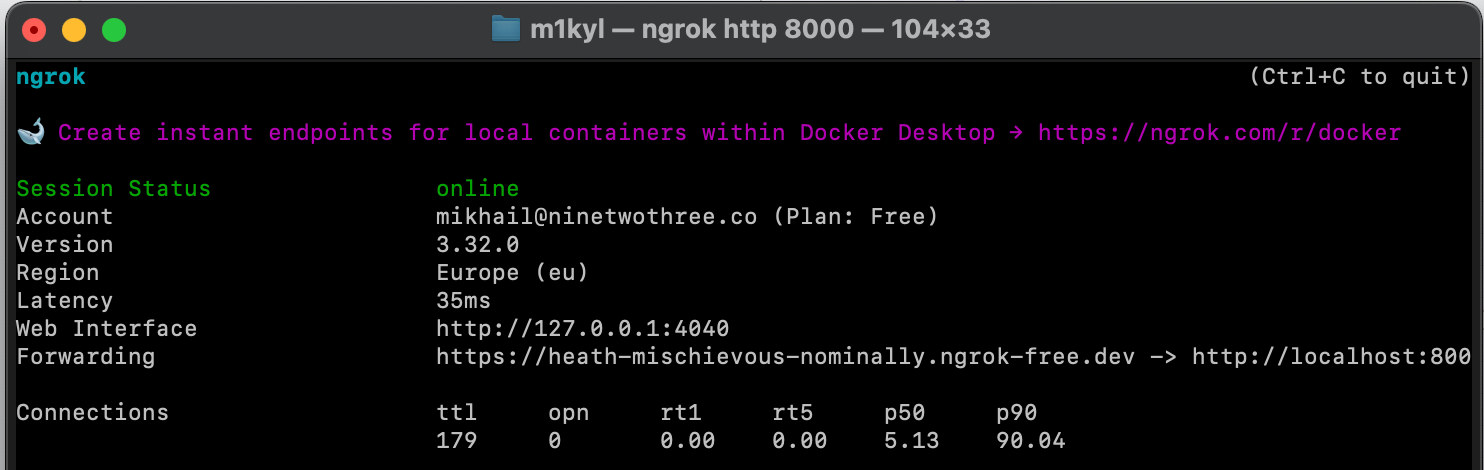
To allow ChatGPT to communicate with the locally running server, it was necessary to expose the server to the internet. This was achieved using ngrok, a tool that creates a secure tunnel to localhost:

ngrok http 8000

Ngrok provided a public URL that forwarded requests to the local server:

https://heath-mischievous-nominally.ngrok-free.dev

Configuring ChatGPT Developer Mode

With the server accessible via a public URL, the next step was to configure ChatGPT to recognize the custom app:

  1. Navigated to ChatGPT Settings > Connectors.
  2. Enabled Developer Mode. It is only available to users on paid plans (e.g. Plus, Pro).
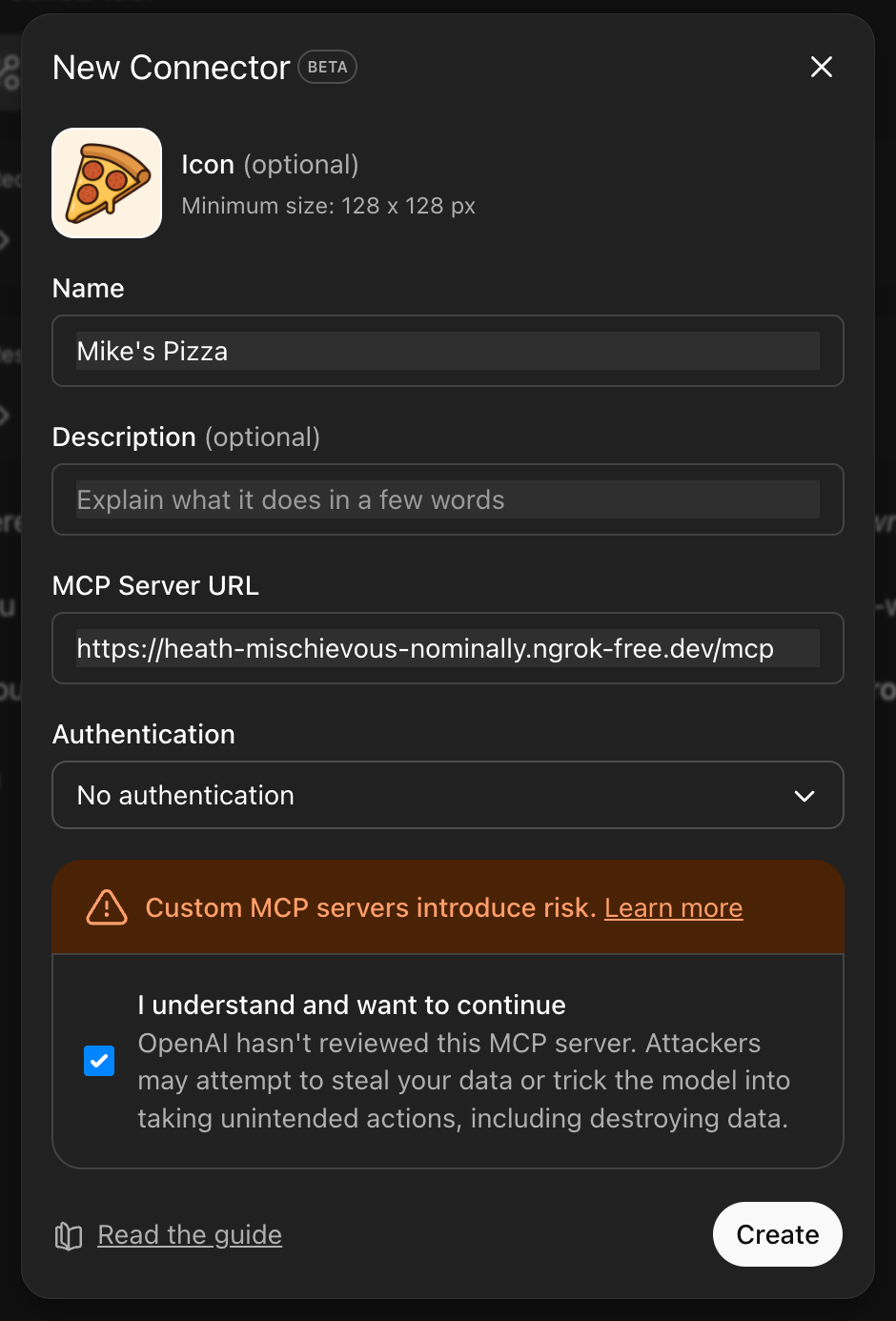
  1. Added a new connector with the following details:
    • Name: Mike's Pizza.
    • MCP Server URL: The public URL provided by ngrok (e.g., https://heath-mischievous-nominally.ngrok-free.dev/mcp).
    • No authentication.

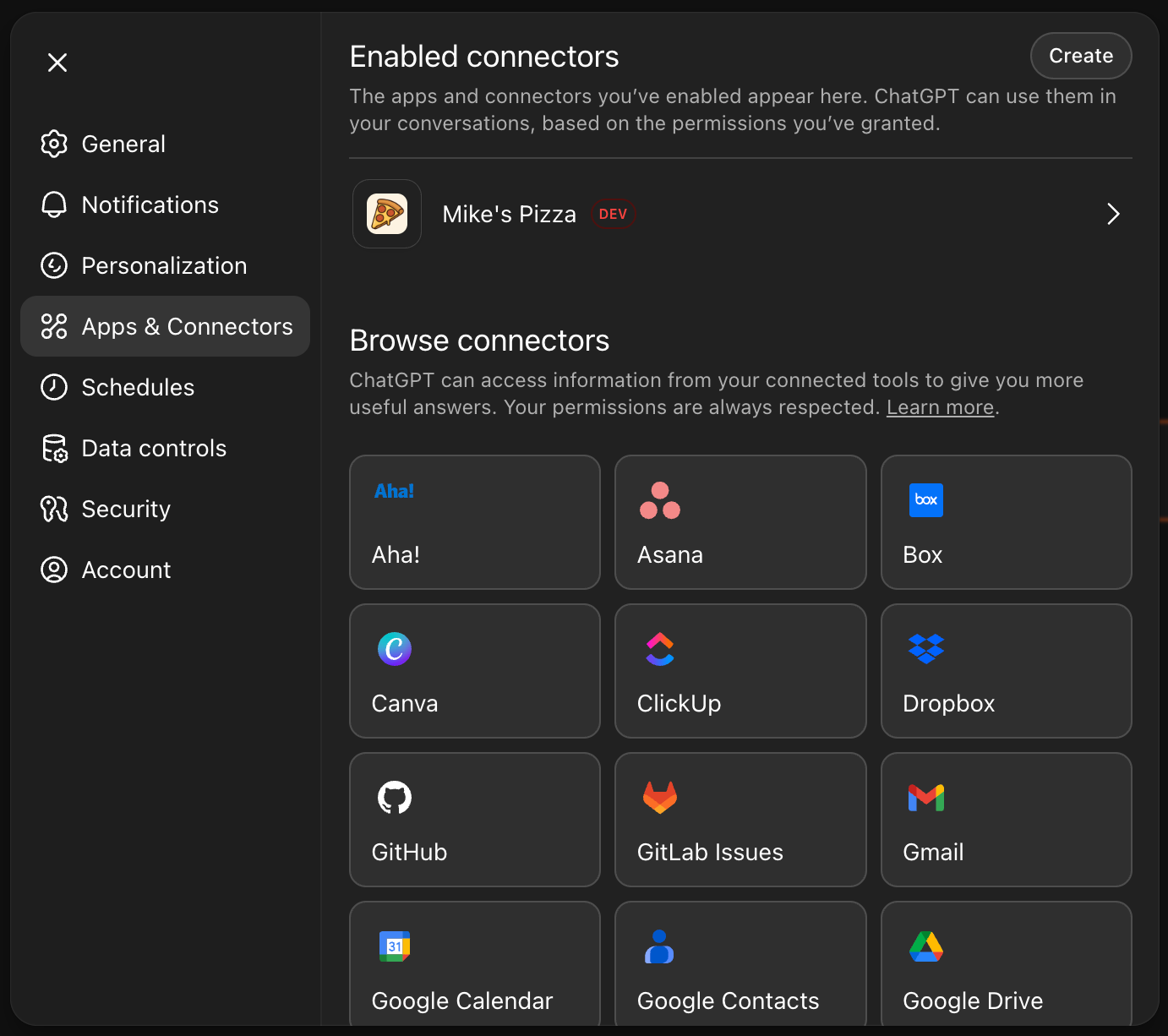
After that the app is listed on enabled connectors list:

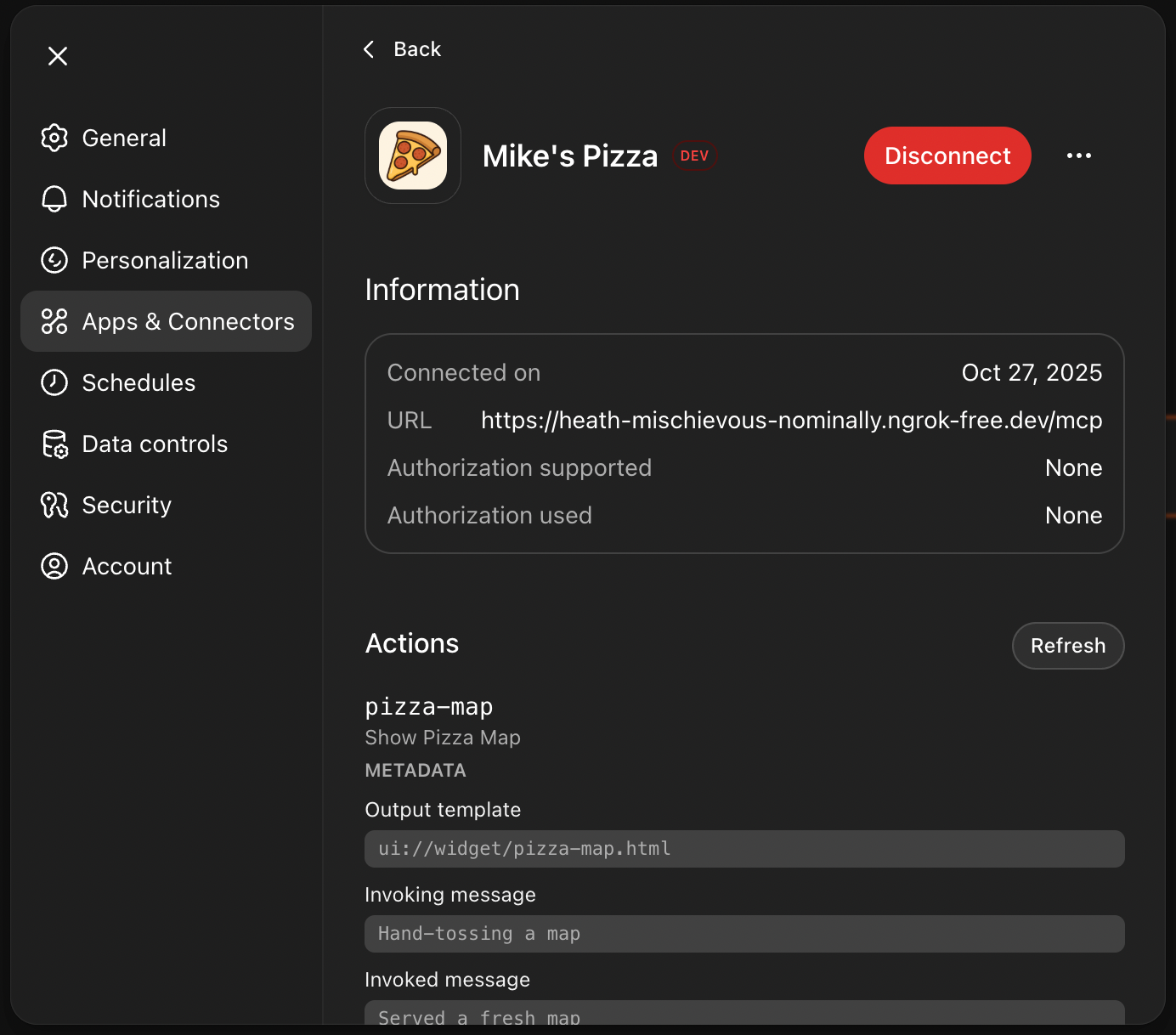
Also, in app details there is the list of actions this app supports.

Interacting with the App in ChatGPT

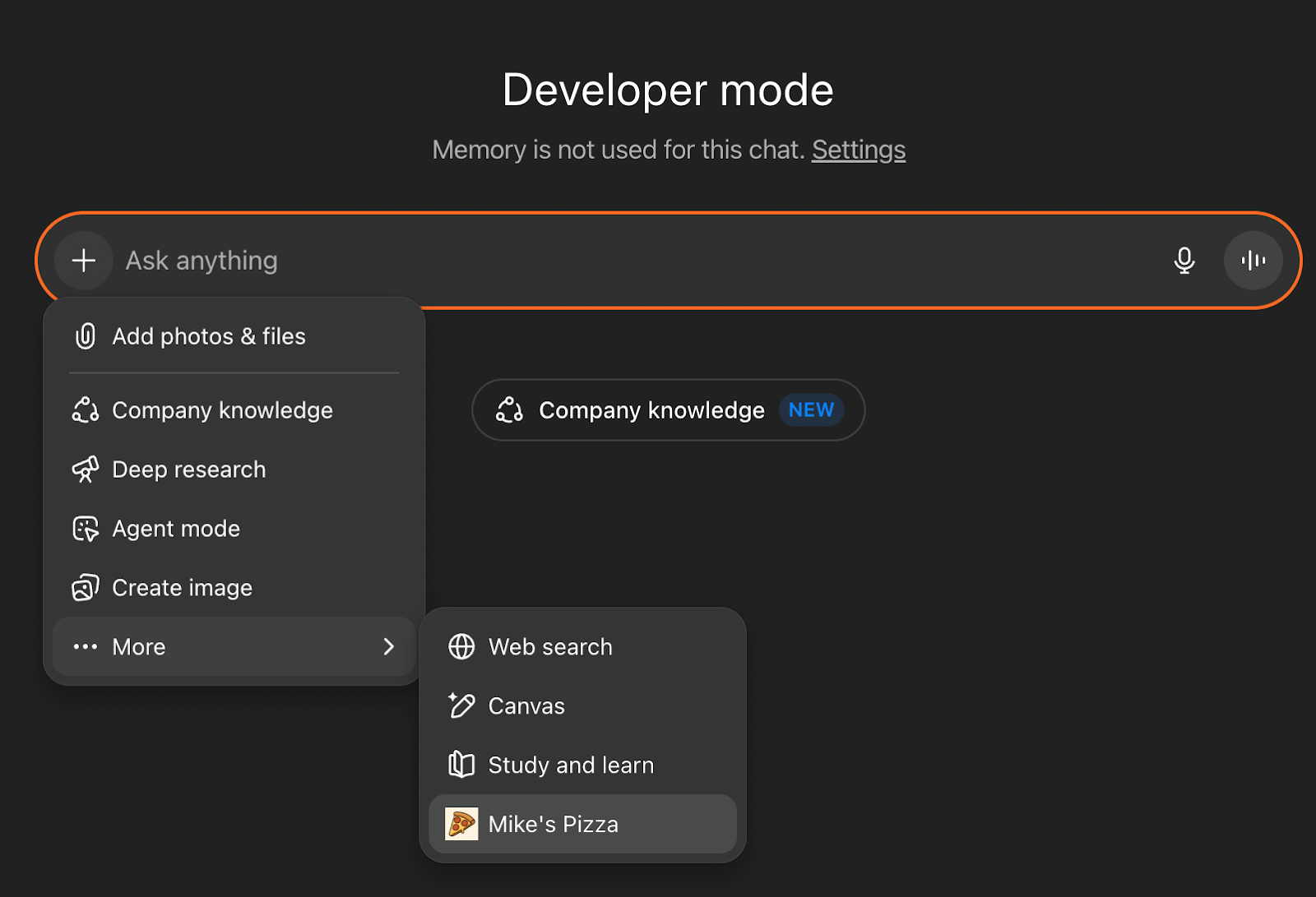
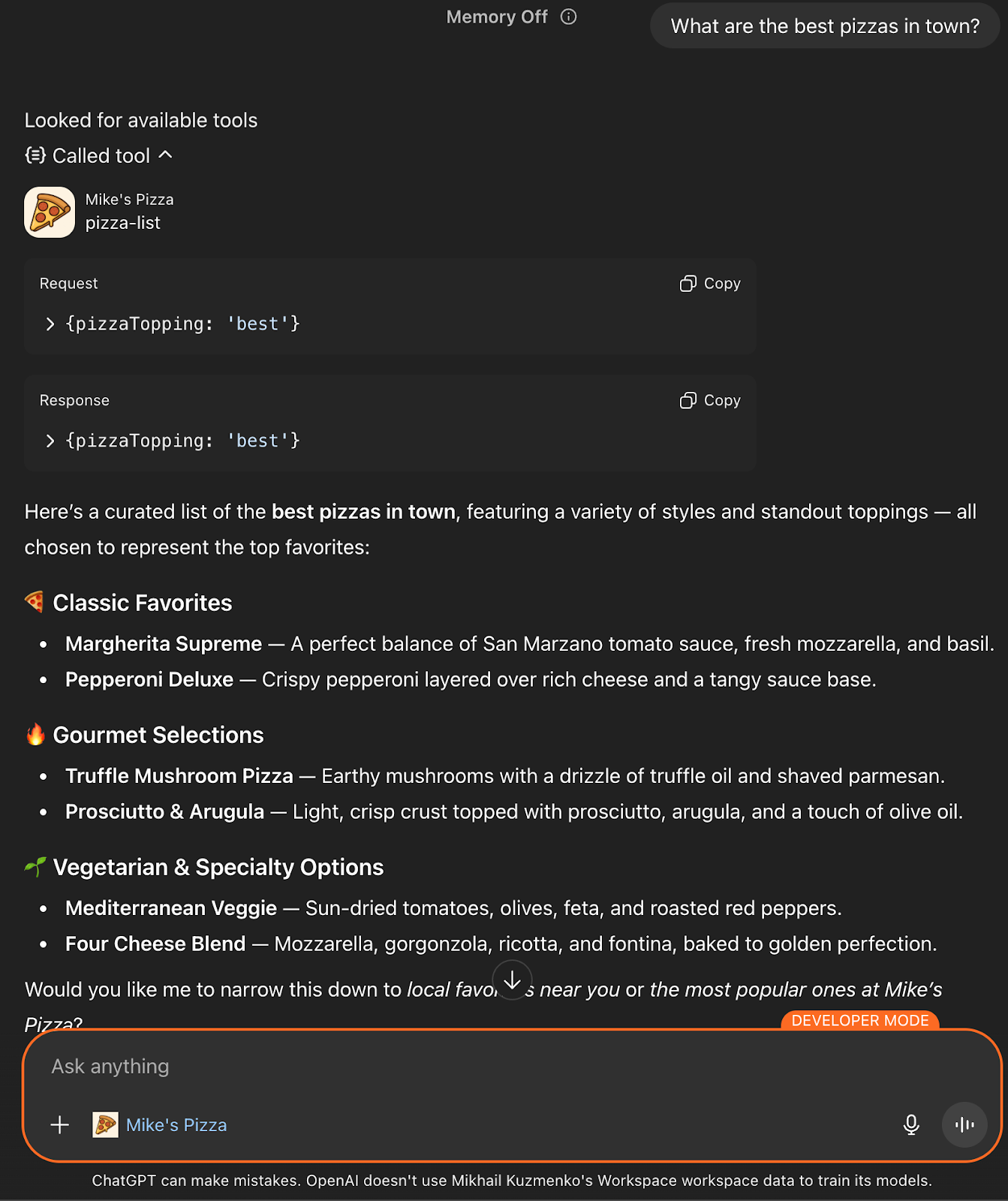
After setting up the connector, the app is ready for interaction. In the nearly created chat in the ‘plus’ menu appears ‘More’ menu where Pizza app can be selected.

Now ChatGPT can be asked with the following questions:

  • What are the best pizzas in town?
  • What pizzas are available on the menu?
  • Can you show me their locations?

ChatGPT responded by invoking the appropriate tools from the Pizza app, rendering interactive widgets like carousels and maps directly within the chat interface.
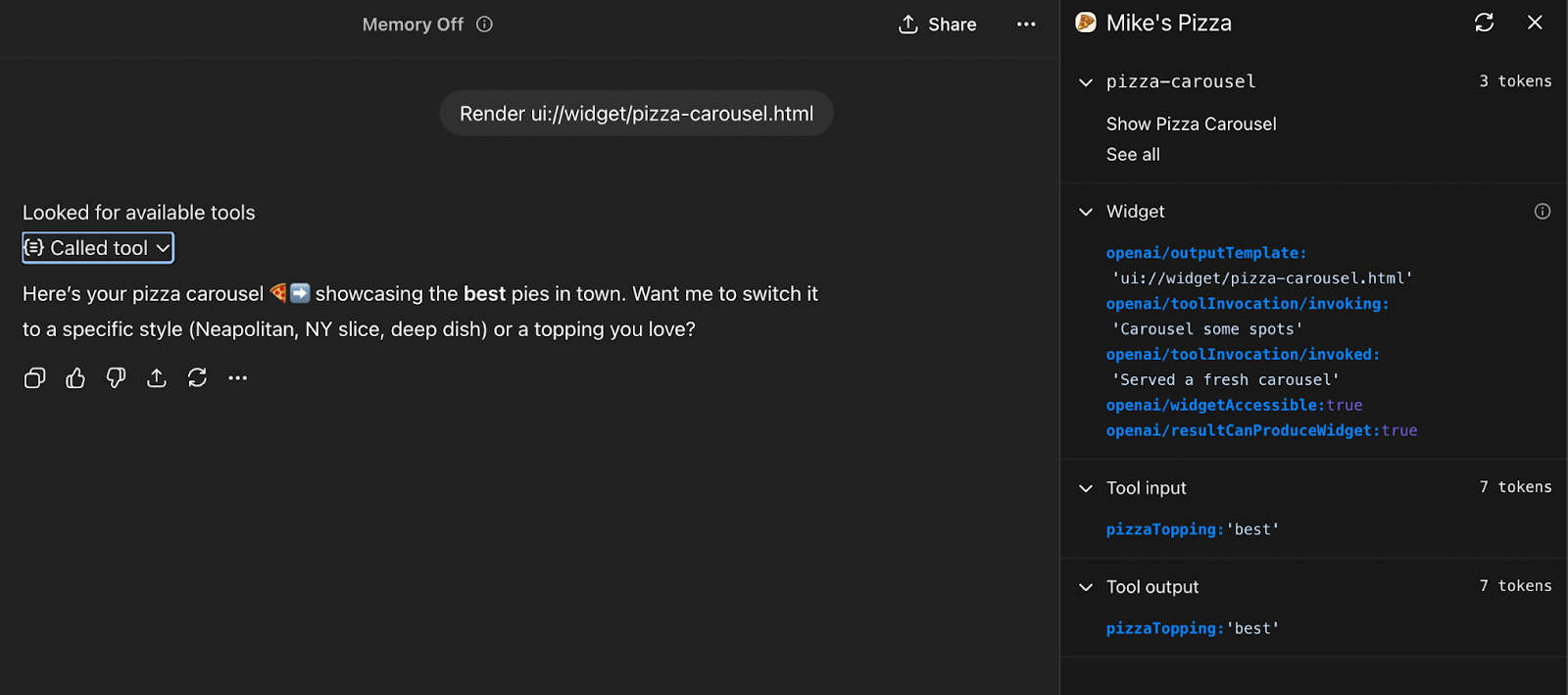
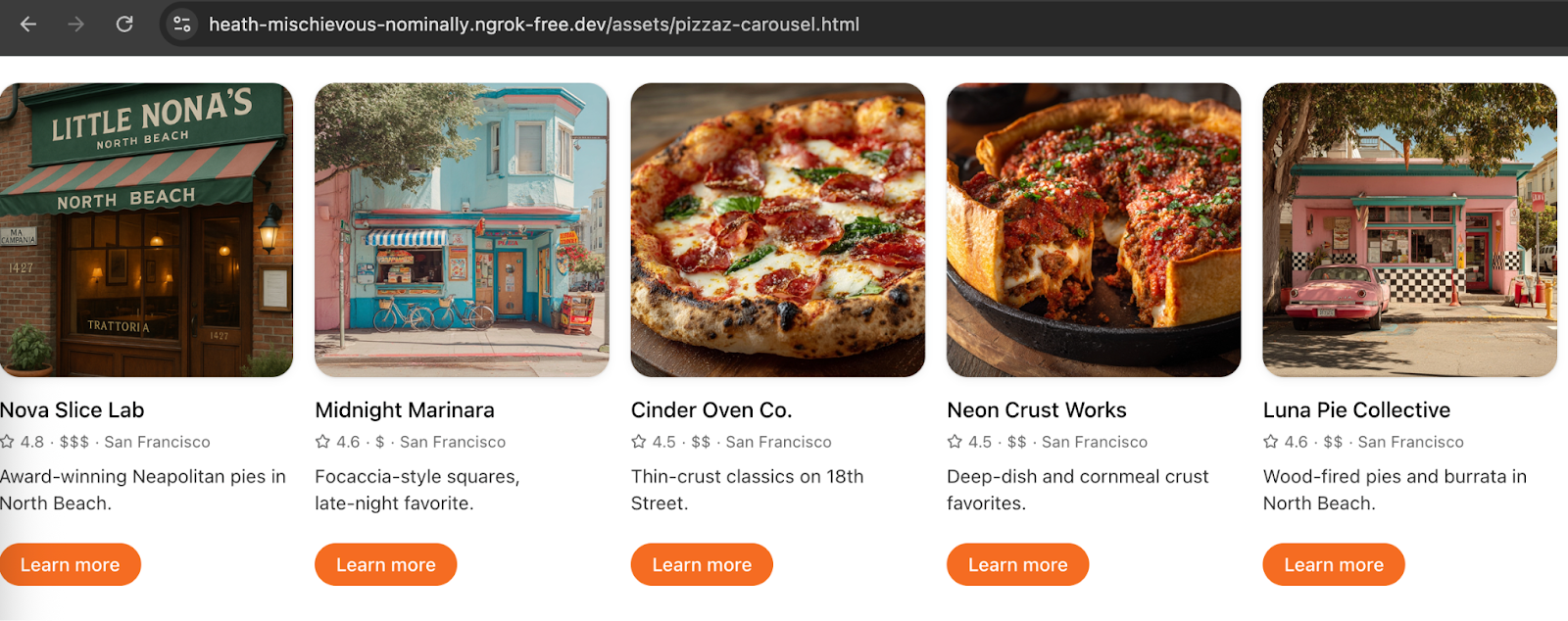
Images aren’t shown in the chat because not all accounts are granted early access to test widgets in their apps, but if ChatGPT is asked directly to render a pizza carousel widget, it will display the result confirming that the logic is working correctly.

Pizza carousel widget html can be opened in the web browser to make sure everything is working and rendering correctly.

So, How Is It Building an App for ChatGPT?

Our testing process provided valuable insights into the integration of custom apps within ChatGPT:

  • Is the integration seamless? Yes. The app's tools and widgets were seamlessly integrated into the ChatGPT interface, providing an interactive user experience.
  • Is it easy to test? The use of ngrok allowed for real-time testing and interaction with the app, facilitating rapid development and iteration.
  • Is it ready for custom apps? This PoC demonstrated the potential for developing and integrating custom applications within ChatGPT, paving the way for more personalized and interactive AI-driven experiences.

The Apps SDK proves that ChatGPT is rapidly evolving from a chatbot into a platform. Whether you are looking to drive conversions or simply provide better utility to your users, the technical pathway is now open.

Ready to Put Your App Inside ChatGPT?

If you saw the "Mike's Pizza" example and thought, "My product needs this," we are ready to execute.

NineTwoThree offers the complete development package for ChatGPT Apps:

  • Feasibility Audits: We analyze your current stack to determine if an MCP integration is the right strategic move.
  • Rapid PoC Development: We can build a working prototype (like the one above) in weeks, so you can test the waters without a massive commitment.
  • Full-Scale Integration: We handle the complex backend, secure authentication, and React-based UI components required to get you live on the platform.

Don't guess at the technology. Partner with the team that has already done the heavy lifting. Book a discovery call.

In our recent article, Apps in ChatGPT: Higher Conversions or Lost Users, we explored the strategic implications of OpenAI’s shift toward becoming a platform. We debated the business pros and cons, and whether owning the interface beats the massive distribution of the ChatGPT ecosystem.

But strategy is only half the battle. We wanted to see exactly what this looks like in practice.

So, in case you’ve decided that this is a solution for you, or you just want to know in more detail what it takes to get running, here is our technical investigation. Our engineering team took a deep dive into the new Apps SDK to see how third-party developers can embed interactive UI and logic directly inside ChatGPT conversations.

Here is what we found.

How Your End-User Interacts With The ChatGPT Apps?

To understand what we are building, we first need to look at ChatGPT Apps from a user’s perspective. Here is how it normally goes: after entering the ChatGPT interface, a user might type something like: ‘Canva, create a social-media post for my product launch’ and the Canva UI appears inside your chat.

As we can see there is a little tag below the text input which shows that ChatGPT recognized an available app from the user's request. You can call the app by prefixing with the app name or ChatGPT can suggest the app during the conversation.

ChatGPT asked to fill the minimum needed information to be able to start a new product.

After being told to fill everything by itself and create something cool and totally random, it wanted to connect to the user's Canva account to be able to save the results.
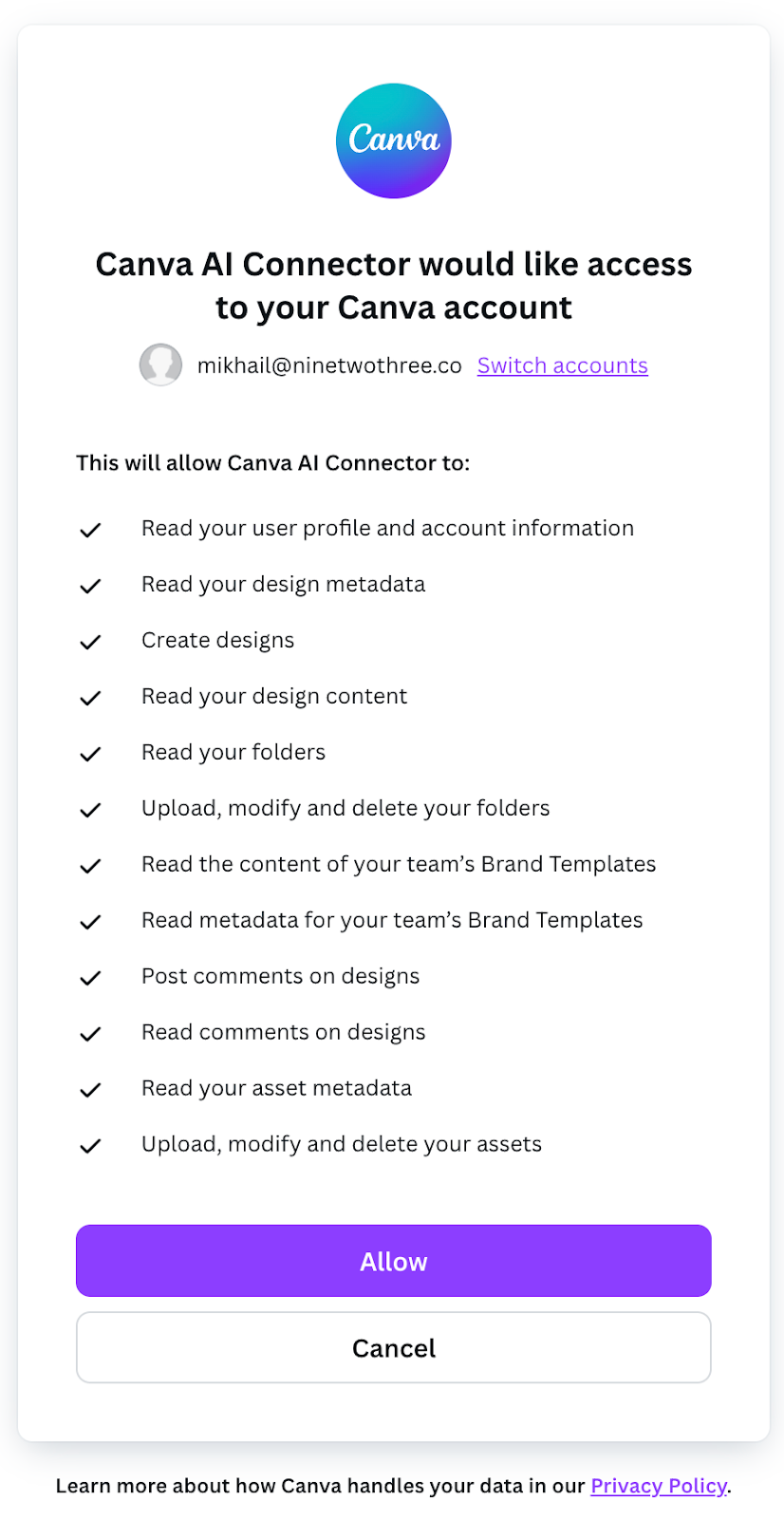
After giving some permissions Canva is finally connected to the ChatGPT and can start producing example data.
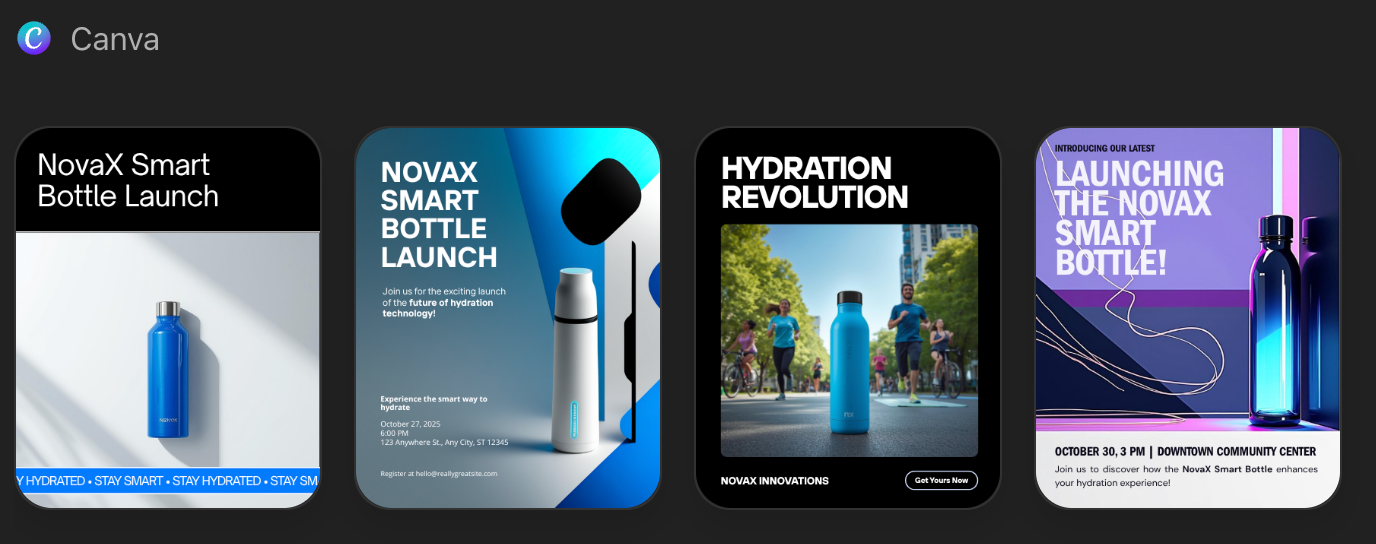
Here Canva created a few examples for the post called ‘NovaX Smart Bottle’, a new smart water bottle (style: bold & energetic, palette: electric blue / black / white). It provided design input for the product:

  • Product name: ‘NovaX Smart Bottle’.
  • Headline / hero text: ‘Stay Hydrated, Stay Smart’.
  • Subline: Intelligent hydration tracking • Long-lasting battery • Sleek reusable design.
  • Style: Bold typography, large headline, modern geometric shapes, product placeholder graphic (photo-style mockup), CTA button area.
  • Color palette (suggested hex): Electric Blue #00A3FF, Deep Black #0A0A0A, White #FFFFFF.
  • Suggested fonts: Montserrat (headline) + Inter (body) or similar clean sans.

How You Can Build Your App in ChatGPT?

As you could see, ChatGPT apps are web-based applications embedded within the ChatGPT interface. That is possible using the Apps SDK: developers provide a web UI and backend logic, while ChatGPT handles the conversational orchestration. This allows your app to respond to natural language commands and interact seamlessly with the user within chat.

But first let’s start with the things you need to know before we proceed with the step-by-step implementation journey.

Key Components

  1. Frontend Web UI – The user interface that ChatGPT will embed. Must be responsive for desktop and mobile.
  2. Backend / API – Processes user input, interacts with services (databases, external APIs, or AI), and returns structured responses.
  3. Manifest / App Configuration – JSON-based configuration that tells ChatGPT:
    • App name.
    • Triggers or commands.
    • Input / output format.
    • Permissions required.

Core concepts

MCP Server

The Model Context Protocol (MCP) server is the foundation of every Apps SDK integration. It exposes tools that the model can call, enforces authentication, and packages the structured data plus component HTML that the ChatGPT client renders inline. Developers can choose between two official SDKs:

  • Python SDK – Ideal for rapid prototyping, including the official FastMCP module.
  • TypeScript SDK – Suitable for Node / React stacks.

These SDKs support frameworks like FastAPI (Python) and Express (TypeScript).

Tool Descriptors

In Apps SDK, tools are the contract between your MCP server and the model. They describe what the connector can do, how to call it, and what data comes back. A well-defined tool includes:

  • Name – Action-oriented and unique (kanban.move_task).
  • Description – Clear explanation of when to use the tool.
  • Input Schema – Defined parameters with types and constraints.
  • Output Schema – Structured data returned by the tool.
  • Metadata – Includes _meta fields like openai/outputTemplate for linking to UI components.

Custom UX Components

UI components turn structured tool results into a human-friendly interface. Apps SDK components are typically React components that run inside an iframe, communicate with the host via the window.openai API, and render inline with the conversation. These components should be lightweight, responsive, and focused on a single task.

The Workflow

Developing a ChatGPT app begins with setting up a server that leverages one of the official SDKs — Python or TypeScript — typically using frameworks such as FastAPI or Express. This server, often referred to as the MCP server, acts as the bridge between ChatGPT and application logic. Within this environment, developers define tools, which are structured descriptors that outline the actions the app can perform, including the expected input and output formats. These tools form the contract between the app and the model, allowing ChatGPT to invoke the correct functionality based on user commands.

The frontend is implemented as a web-based UI that is embedded within ChatGPT’s chat interface. This UI is usually built with frameworks like React and communicates with the host through the window.openai API. The design of the UI should prioritize responsiveness and simplicity, ensuring a smooth experience for users on both desktop and mobile devices. Authentication mechanisms must also be integrated to verify user identity and maintain session context. Finally, persistent state management ensures that relevant user data and interactions can be stored securely, enabling multi-step or context-sensitive workflows.

Deployment Considerations

Once the app is developed, deploying it requires careful attention to platform requirements and security standards:

  • All endpoints must be served over HTTPS to ensure secure communication between the ChatGPT client and the MCP server. 
  • UI components need to be properly bundled and served with the appropriate MIME type to enable embedding. 
  • During development, tools such as ngrok can be used to expose local servers for testing and iteration. 
  • Environment-specific configuration, including API keys and secrets, should be managed securely through environment variables or platform secret managers. 
  • Observability is equally important: logging request identifiers, response times, and error messages allows developers to monitor performance and quickly diagnose issues.

Security and Privacy

Security and privacy are critical considerations when building ChatGPT apps:

  • Data handling practices should be minimal, collecting only the information necessary for the app’s functionality. 
  • Users must be informed about data usage, and consent should be obtained when required. 
  • Access controls, such as role-based permissions, help prevent unauthorized actions and maintain the integrity of the system. 
  • Compliance with relevant data protection regulations and OpenAI’s policies is essential to ensure that the app adheres to both legal and platform standards. 
  • Developers should also consider security audits and regular review of their code and infrastructure to proactively address potential vulnerabilities.

Testing and Optimization

Testing a ChatGPT app involves both functional validation and performance monitoring.

  • Rich metadata in tool descriptors enhances discoverability and ensures that the model correctly interprets app capabilities.
  • Backend endpoints should be stress-tested for scalability, while front-end components must be validated for responsiveness across device types. 
  • Collecting user feedback provides insights into usability and helps refine both the interface and core functionality. 
  • Optimization is an ongoing process: balancing performance, security, and user experience ensures that the app can operate effectively within the ChatGPT ecosystem while providing a seamless experience for end users.

Can You Build Native Mobile Apps in ChatGPT?

ChatGPT apps are inherently web-based and run inside the ChatGPT interface; it is not currently possible to embed fully native mobile code directly within the ChatGPT mobile app. This design has important implications for developers targeting iOS, Android, or cross-platform frameworks such as React Native.

To provide a seamless experience across mobile devices, developers must build a responsive web UI for their app. This UI should adapt to varying screen sizes and orientations, ensuring usability on smartphones and tablets. CSS frameworks, such as Tailwind or Bootstrap, or front-end frameworks like React, Vue, or Svelte, can help achieve a mobile-friendly design while keeping the interface lightweight enough to render smoothly inside ChatGPT.

For teams that already maintain a mobile app — such as a React Native application — ChatGPT apps can serve as a subset or extension of the full-feature app. Users may start with the ChatGPT-embedded web interface and, if additional functionality is required, transition seamlessly to the native app via deep linking. This approach allows developers to leverage the ChatGPT user base while still offering richer experiences in their native apps.

There are, however, some constraints and considerations to be aware of:

  1. Native integration limitations: ChatGPT does not allow embedding native mobile components directly; all interactivity must occur via web-based components.
  2. Authentication and session management: Developers must implement mechanisms to bridge user identity between ChatGPT and their backend systems. This ensures continuity of personalized experiences and secure access to user-specific data.
  3. Performance considerations: Mobile devices vary in screen resolution and processing power, so the web UI should be optimized for speed and responsiveness, avoiding heavy scripts or large assets.
  4. Cross-platform testing: Even with a responsive web design, testing across different mobile operating systems, browsers, and ChatGPT app versions is critical to ensure consistent behavior.

Overall, the recommended approach is to treat the ChatGPT app as a mobile-accessible mini-app that provides core functionality, while using deep links or integration with your native app to deliver more advanced features. This hybrid strategy maximizes reach within ChatGPT while preserving the richness and performance of your full mobile experience.

How Can You Make Money with ChatGPT Apps?

OpenAI is exploring monetization for apps in ChatGPT:

  • Revenue may be based on usage metrics, in-chat purchases, or subscriptions.
  • Currently, monetization is in preview. Details are evolving.
  • Possible approaches for developers:
    • Freemium model (basic features free, premium features paid via site / app).
    • Usage-based billing for actions performed inside the app.
    • Affiliate or transaction-based revenue if the app enables commerce.

But there are some caveats. Policies are still developing. OpenAI will provide updated announcements later. So, built-in monetization flows may not be immediately available.

Does It Actually Work? Our "Mike's Pizza" Experiment

This chapter outlines the steps taken to test the Pizza app example from the OpenAI Apps SDK Examples repository. The process served as a proof of concept (PoC) to evaluate the integration of custom widgets and tools within ChatGPT.

Cloning the Repository and Installing Dependencies

The initial step involved cloning the official OpenAI Apps SDK Examples repository:

git clone https://github.com/openai/openai-apps-sdk-examples.git
cd openai-apps-sdk-examples

Subsequently, the necessary dependencies were installed using pnpm:

pnpm install
pre-commit install

These commands set up the required packages for both the frontend components and the backend server.

Building the Frontend Assets

Before starting the server, it was essential to build the frontend assets. This was accomplished by running:

pnpm run build

This command generated the necessary HTML, JavaScript, and CSS files within the assets/ directory, which are crucial for rendering the widgets in ChatGPT.

Running the MCP Server

With the frontend assets in place, the next step was to start the backend server using:

pnpm start

Exposing the Local Server to the Internet

To allow ChatGPT to communicate with the locally running server, it was necessary to expose the server to the internet. This was achieved using ngrok, a tool that creates a secure tunnel to localhost:

ngrok http 8000

Ngrok provided a public URL that forwarded requests to the local server:

https://heath-mischievous-nominally.ngrok-free.dev
Configuring ChatGPT Developer Mode

With the server accessible via a public URL, the next step was to configure ChatGPT to recognize the custom app:
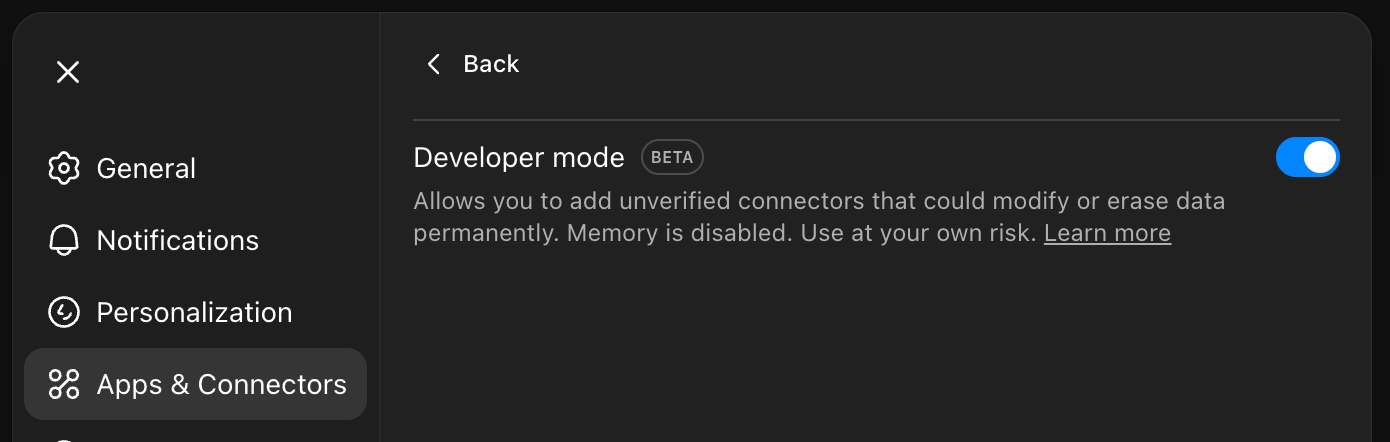
  1. Navigated to ChatGPT Settings > Connectors.
  2. Enabled Developer Mode. It is only available to users on paid plans (e.g. Plus, Pro).
  1. Added a new connector with the following details:
    • Name: Mike's Pizza.
    • MCP Server URL: The public URL provided by ngrok (e.g., https://heath-mischievous-nominally.ngrok-free.dev/mcp).
    • No authentication.

After that the app is listed on enabled connectors list:
Also, in app details there is the list of actions this app supports.
Interacting with the App in ChatGPT

After setting up the connector, the app is ready for interaction. In the nearly created chat in the ‘plus’ menu appears ‘More’ menu where Pizza app can be selected.
Now ChatGPT can be asked with the following questions:
  • What are the best pizzas in town?
  • What pizzas are available on the menu?
  • Can you show me their locations?

ChatGPT responded by invoking the appropriate tools from the Pizza app, rendering interactive widgets like carousels and maps directly within the chat interface.
Images aren’t shown in the chat because not all accounts are granted early access to test widgets in their apps, but if ChatGPT is asked directly to render a pizza carousel widget, it will display the result confirming that the logic is working correctly.
Pizza carousel widget html can be opened in the web browser to make sure everything is working and rendering correctly.
So, How Is It Building an App for ChatGPT?

Our testing process provided valuable insights into the integration of custom apps within ChatGPT:

  • Is the integration seamless? Yes. The app's tools and widgets were seamlessly integrated into the ChatGPT interface, providing an interactive user experience.
  • Is it easy to test? The use of ngrok allowed for real-time testing and interaction with the app, facilitating rapid development and iteration.
  • Is it ready for custom apps? This PoC demonstrated the potential for developing and integrating custom applications within ChatGPT, paving the way for more personalized and interactive AI-driven experiences.

The Apps SDK proves that ChatGPT is rapidly evolving from a chatbot into a platform. Whether you are looking to drive conversions or simply provide better utility to your users, the technical pathway is now open.

Ready to Put Your App Inside ChatGPT?

If you saw the "Mike's Pizza" example and thought, "My product needs this," we are ready to execute.

NineTwoThree offers the complete development package for ChatGPT Apps:

  • Feasibility Audits: We analyze your current stack to determine if an MCP integration is the right strategic move.
  • Rapid PoC Development: We can build a working prototype (like the one above) in weeks, so you can test the waters without a massive commitment.
  • Full-Scale Integration: We handle the complex backend, secure authentication, and React-based UI components required to get you live on the platform.

Don't guess at the technology. Partner with the team that has already done the heavy lifting. Book a discovery call.

color-rectangles

Subscribe To Our Newsletter